

Mobile icons

Why Booking.com for Business and AirPlus?

Simple, centralised payments
No need for individual company cards or complex expense claims.
Transparency
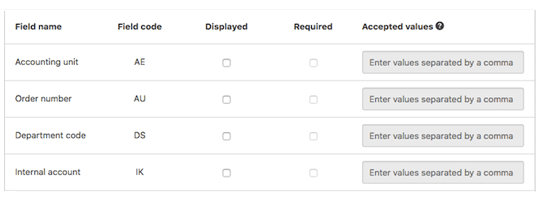
Use AirPlus DBI fields to group spend by department, event and more.
More control
Specify a balance on each card. Decide what it should be spent on and by who.
Security
Cutting-edge virtual card technology keeps payments safe.
Over 28.9M listings
From hotels to homes, the perfect place at the right price, wherever work takes you.
“This has taken the hassle away from our company’s in-house travel office expense management, providing better data accuracy and security. We can now combine a seamless central payment solution and an efficient corporate travel program with the large accommodation offering of Booking.com.“
– GrandVision Italy Srl Unipersonale

Booking.com for Business

Booking.com for Business is the easy way to stay on top of your company’s business travel. With over 28.9 million listings, including homes, apartments and hotels, you’ll find the perfect place for any business trip.

Keep track of your travel spend with customisable reports and save money with exclusive deals and an additional 10% Genius discount.

The best part? It’s completely free, forever.

AirPlus Virtual Cards

The award-winning virtual payment solution from AirPlus offers a simple, secure, and convenient way to manage your company’s travel expenses.

With Airplus’ virtual card technology, you can centralise payment processes across your business and settle all transactions through your AirPlus company account.

Bundled invoicing makes reconciliation simple, so you can focus on booking the next trip.

“Reservations on Booking.com are easy and now the AirPlus payment integration simplifies the operational processes for our accounting department a lot. Additionally, Booking.com supports our travelers with the biggest accommodation portfolio worldwide, even in the most remote places.“
– Formel D GmbH

How to integrate AirPlus and Booking.com for Business

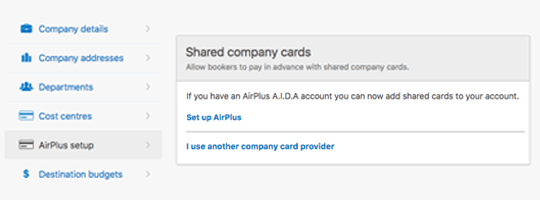
First you’ll need both a Booking.com for Business account and an AirPlus account. Once these have been created, go to the company settings tab in your Booking.com for Business account.

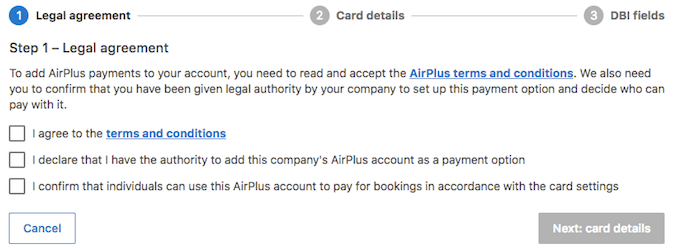
For safety and security purposes, review and confirm all terms and conditions before connecting your AirPlus company account.

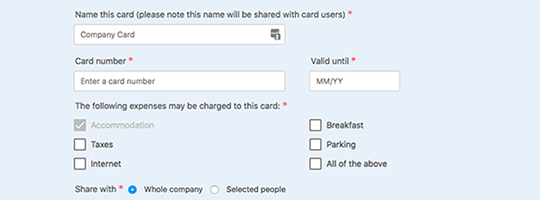
Add your UATP details, choose who can use the card and which expenses may be charged to it. Want to connect multiple cards? You can always add more or edit your AirPlus settings later on.

Decide which fields you want your travellers to fill out during the booking process. These will show in your AirPlus statements.

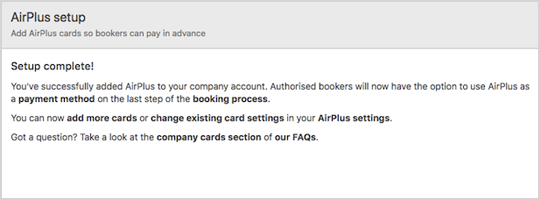
Once setup is complete, authorised bookers will have the option to use AirPlus as a payment method during the booking process.

Get started with seamless payments

Already have a Booking.com for Business account and an AirPlus account?
Sign in here to get started.
Do you have a Booking.com for Business account?
Do you have an AirPlus company account
This select is required